

- Shopify is usually easier to launch and run; WordPress with WooCommerce offers more flexibility but more upkeep.
- Neither platform guarantees better search rankings. Content, site structure and speed matter more than the platform name.
- Check GST handling, local payment options, shipping rates and support before you commit.
- Compare total running costs over a few years, not just the starting cost.
- Plan for how you would move later, because switching platforms takes real time and care.
Which is better for an Australian online store: WordPress or Shopify?
Neither is better for everyone. For a small business with a clear product range and no in-house technical person, Shopify is often the easier path. For a business that publishes a lot of content, needs unusual features or wants full control, WordPress with WooCommerce is often the better fit.
At Sydney WEB team, we start with the business rather than the platform. The questions that usually settle it are:
- How many products do you sell, and how often do they change?
- Who will manage the store day to day?
- Do you need custom features, such as complex quoting, memberships or unusual pricing?
- How important is a large blog or content library to your marketing?
If your answers point to a simple, product-led store, lean towards Shopify. If they point to a content-led site with a store attached, or something custom, lean towards WordPress.
What are WordPress, WooCommerce and Shopify in plain language?
The names get mixed up, so here are the key terms.
- WordPress is a free, open-source content management system (CMS). A CMS is software that lets you edit pages, posts and images without writing code. Here we mean the self-hosted version from WordPress.org, not the separate hosted service at WordPress.com.
- WooCommerce is a free plugin that adds shopping features to WordPress, such as products, a cart and checkout. A plugin is an add-on that extends what the website can do. WooCommerce is developed by Automattic.
- Shopify is a hosted e-commerce platform created by Shopify, a Canadian company. ‘Hosted’ means Shopify runs the servers, security and core software for you, and you pay a subscription to use it.
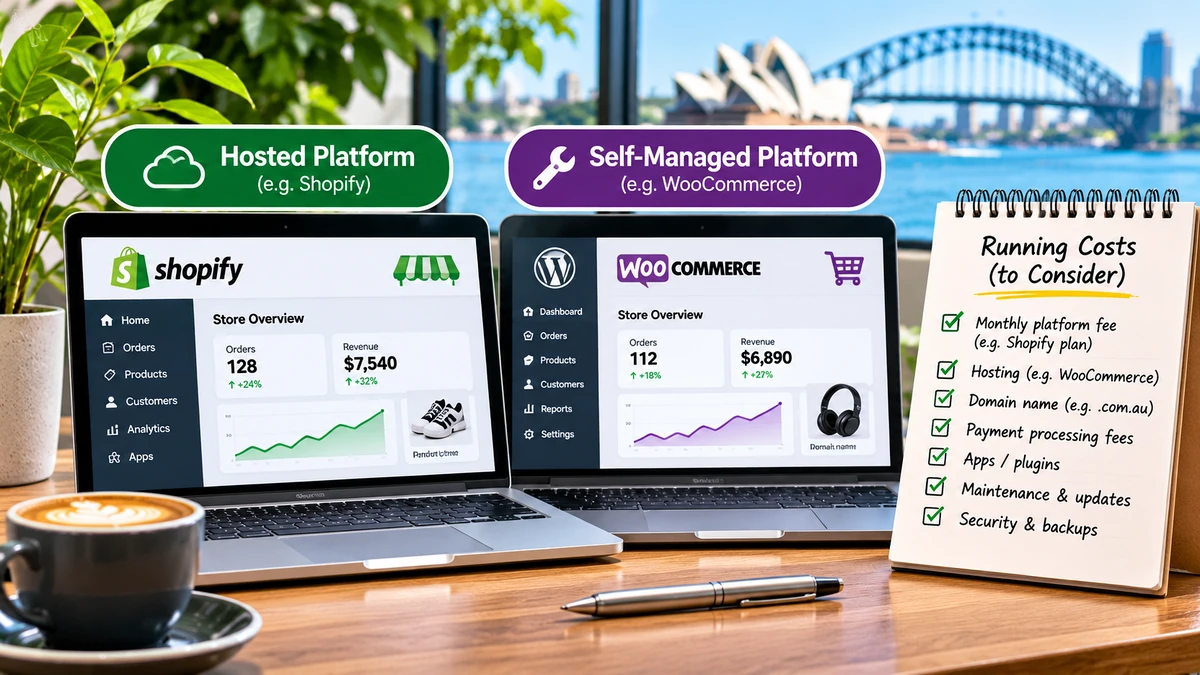
The practical difference is who looks after what. With Shopify, much of the technical work is handled for you. With WordPress and WooCommerce, you or your web team arrange hosting, updates, security and backups.
How do WordPress and Shopify compare on cost, setup and upkeep?
Cost is the question we hear first, but the starting price rarely tells the full story. Think in terms of total running cost over a few years.
Setup and design
Shopify stores can be set up quickly using themes, and the checkout is already built and tested. That suits businesses that want to start selling without a long build.
WordPress with WooCommerce takes more decisions: hosting, a theme, plugins for payments, shipping and more. The upside is flexibility. The downside is more moving parts and more time to get right.
Ongoing costs
Shopify typically involves a monthly subscription, paid apps for extra features and possibly transaction fees depending on how you take payments. WordPress itself is free, but you pay for hosting, premium plugins or themes, and ongoing development or maintenance time.
Neither is automatically cheaper. A busy WordPress store that needs lots of paid plugins and developer time can cost more than a straightforward Shopify store, and the reverse can also be true. Our plain-English website pricing guide explains what drives costs in more detail.
Maintenance and security
On WordPress, updates to the core software, plugins and theme are your responsibility. Skipping them can create security and stability risks. Shopify handles platform updates, though apps and theme customisations still need attention.
Which platform is better for SEO and AI search?
Both platforms can perform well in search. Neither can guarantee rankings. What tends to matter most is the quality of your product pages, clear category structure, fast loading and useful content that answers customer questions.
There are some differences worth knowing:
- WordPress gives you a lot of control over page structure, URLs and content, and it is well suited to running a substantial blog or resource section alongside your store.
- Shopify covers the SEO basics well, but has a fairly fixed URL structure, such as separate paths for products and collections. For most stores this is not a problem, though it limits some customisation.
Speed depends on the build rather than the platform name. Heavy themes, too many plugins or apps and oversized images can slow either one down.
If search is a major sales channel, plan it from the start. Our SEO and local search service covers the groundwork, such as site structure, product page content and technical checks.
The same habits help with AI assistants that summarise or recommend businesses. Clear product descriptions, accurate business details and well-structured pages make your information easier to understand and quote, but no one can promise a particular outcome.
What Australian-specific things should you check before choosing?
Platforms are built for a global market, so check the local details early.
- GST: Confirm how each platform handles GST-inclusive pricing, tax invoices and reporting. Ask your accountant to review the setup.
- Payments: Check that the payment gateways you want are supported, including card payments, PayPal and any buy now, pay later providers your customers expect.
- Shipping: Look at how each platform connects with Australia Post and other carriers, and whether it supports the rates, zones and label printing you need.
- Consumer law: The Australian Competition and Consumer Commission (ACCC) enforces the Australian Consumer Law. Make sure your returns, refunds and pricing information are clear and suit your products.
- Support: Consider who you would call when something breaks, and whether they work in your time zone.
- Speed for local visitors: Ask where the site is hosted and how it performs for customers in Australia.
Fees and features change over time, so confirm current details directly with each provider before deciding.
When does Shopify suit, and when does WordPress suit?
Shopify tends to suit businesses that:
- want to launch quickly with a proven checkout
- have a clear product catalogue and mainly sell online
- have no technical staff and prefer predictable platform maintenance
- are happy to use apps for extra features
WordPress with WooCommerce tends to suit businesses that:
- rely on content, such as guides, news or a large blog, to attract customers
- need custom features or unusual pricing and ordering rules
- want full ownership and control of the site and its data
- have a web team or developer to manage updates and security
Some businesses sit between the two. A tradesperson selling a few products alongside services, for example, may be better served by a standard business site with a small store than by a full e-commerce build.
If you are weighing a bigger project, our e-commerce web design service explains how we approach store builds. Whichever platform you pick, the design and checkout experience affect sales more than the logo on the admin panel. Our retailer’s checklist for a high-converting store is a useful companion.

How should you make the final decision?
Use a short, structured process rather than gut feel.
- List your requirements. Separate must-haves from nice-to-haves.
- Shortlist one or two options. More than that usually creates confusion.
- Estimate total costs. Include apps or plugins, hosting, maintenance and your own time.
- Test the key journeys. Add a product, check out, apply GST, calculate shipping and process a refund.
- Ask about exit options. Find out how you could export products, customers and content if you changed platforms later.
Moving platforms is possible, but it takes planning, particularly if you want to keep your search visibility. Choosing carefully now saves effort later.
If you would like a second opinion, talk to a team that has no reason to push one platform over the other. Ask to see relevant past work and how the store has been maintained since launch.
Frequently Asked Questions
Is Shopify or WordPress better for a small Australian business?
It depends on your needs. Shopify is often easier for small businesses with a defined product range and no technical staff. WordPress with WooCommerce suits businesses that want more control, rely heavily on content or need custom features. Compare total costs, support and how much time you can spend managing the site.
Is WooCommerce the same as WordPress?
No. WordPress is the content management system that runs your website. WooCommerce is a plugin you add to WordPress to sell products online. You can have a WordPress site without WooCommerce, but you need WooCommerce or a similar plugin to run a store on WordPress.
Which platform is cheaper to run?
Neither is cheaper in every case. Shopify usually has a subscription plus app costs, while WordPress is free software but needs hosting, plugins and maintenance. The total depends on your features and who manages the site, so compare estimates over several years rather than only the starting cost.
Can I rank well on Google with Shopify?
Yes, Shopify stores can rank well, but nothing is guaranteed. Results depend on factors such as content quality, site structure, speed, competition and how well your product pages answer customer questions. The platform is only one part of the picture, and the same is true for WordPress.
Can I move from Shopify to WordPress, or the other way?
Yes, but it takes planning. You will need to move products, customer data, content and redirects so old links still work. Handled poorly, a migration can hurt search visibility and sales. It is worth asking about exit options before you choose a platform.
Do both platforms handle GST and Australian shipping?
Both can generally be set up for GST and Australian shipping, but the details vary by plan, plugin or app. Check how each handles GST-inclusive pricing, tax invoices and carrier rates, and ask your accountant to review the setup before you launch.
Published by The WEB team.